
If your business is appointing Balanceable as its BAS agent, you may first need to nominate us in the ATO's Online services for business. This is a secure ATO process that confirms the relationship between your business and Balanceable.
This guide covers the steps for nominating Balanceable Pty Ltd as your BAS agent. The nomination must be completed by the business - it cannot be completed on your behalf.
Who needs to nominate Balanceable?
Businesses with an ABN that are not sole traders need to nominate Balanceable when engaging us as their BAS agent. This includes companies, partnerships, trusts, not-for-profits, joint ventures and cooperatives.
You may also need to complete a new nomination if Balanceable begins representing your business for a new BAS-related obligation.
Why sole traders don't need to nominate
Sole traders are currently excluded from the ATO's client-to-agent linking process. If you operate as a sole trader, you do not need to complete this nomination at this time.
The ATO has introduced client-to-agent linking in stages. Its current requirements apply to ABN entities other than sole traders, so the process in this article is for businesses with a different legal structure.
Why nomination is required
The ATO introduced client-to-agent linking to help protect business information from unauthorised access and identity related fraud. Nominating Balanceable creates a secure link between your business and our BAS agent practice before we add your business as a client.
It is a one-time step for the relationship unless you need to change the BAS related authorisations provided to Balanceable.
Before you start
For the first two steps, you must be the business's principal authority - the person responsible for the business whose role is recorded with the relevant government register. For example, this may be a director, partner, trustee or public officer.
- Have access to a smartphone or tablet to set up your myID.
- Have a Strong myID if you want to link the business ABN in RAM online.
- Make sure your name and role are recorded correctly on the Australian Business Register or other relevant register.
- Keep the Balanceable BAS agent details below handy for the nomination step.
If you have a Standard myID, or you are a principal authority not listed as an individual associate in the Australian Business Register, the ATO or RAM support can help you complete the business linking step.
How to nominate Balanceable as your BAS agent
1. Set up your myID
Download the myID app from the Apple App Store or Google Play, then follow the prompts to set up your Digital ID. Your myID is personal to you and must not be shared.
Choose an identity strength. A Strong myID allows eligible principal authorities to link their business online in RAM. The ATO explains the identity documents needed for each strength in its agent-nomination instructions.
2. Link your business in RAM
Sign in to Relationship Authorisation Manager (RAM) using your myID. If you have a Strong myID and are listed in the Australian Business Register, select Link your business and follow the prompts to link your business ABN.
Once this is complete, you can access Online services for business on behalf of the business. The RAM principal-authority guidance can help confirm whether you are the right person to set up the link.
3. Access Online services for business
Sign in to Online services for business using your myID. From the home page, select Profile, then Agent details.
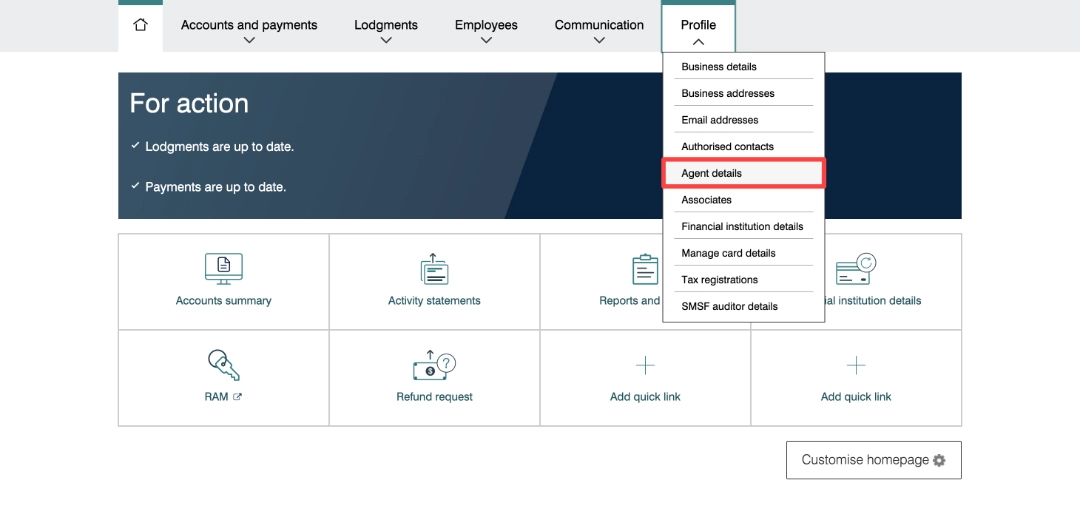
Select Profile, then Agent details.
4. Nominate Balanceable
In the Agent nominations section, select Add.
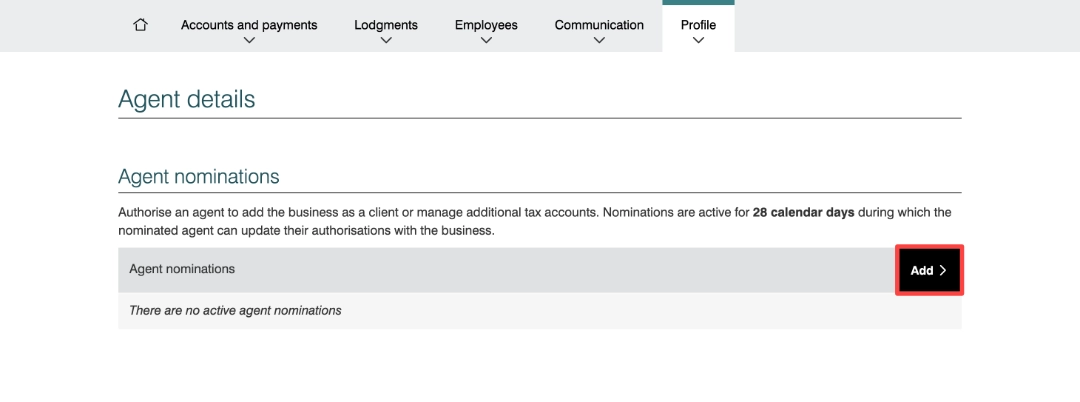
Select Add in the Agent nominations section.
On the Nominate agent screen, search using our BAS agent number:
- Company name: Balanceable Pty Ltd
- ABN: 49 688 602 020
- BAS agent number: 26357764
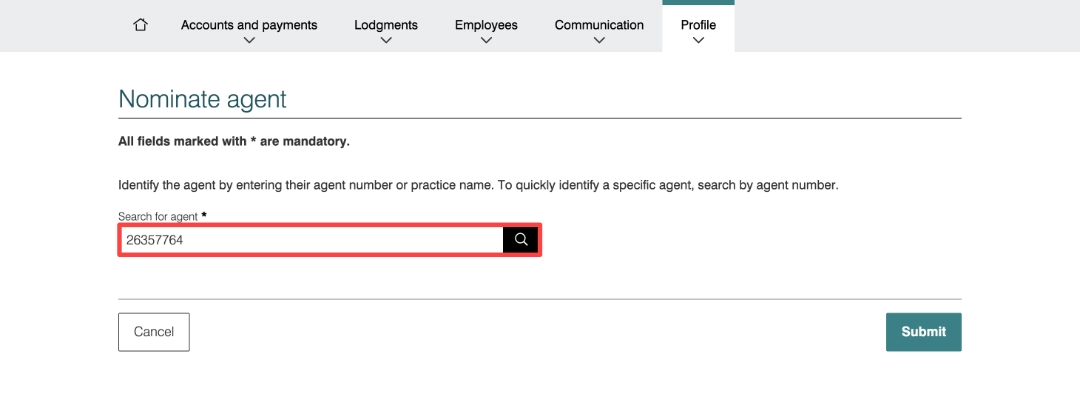
Enter 26357764 and select Search.
Select Balanceable Pty Ltd, check that the details are correct, complete the declaration and select Submit.
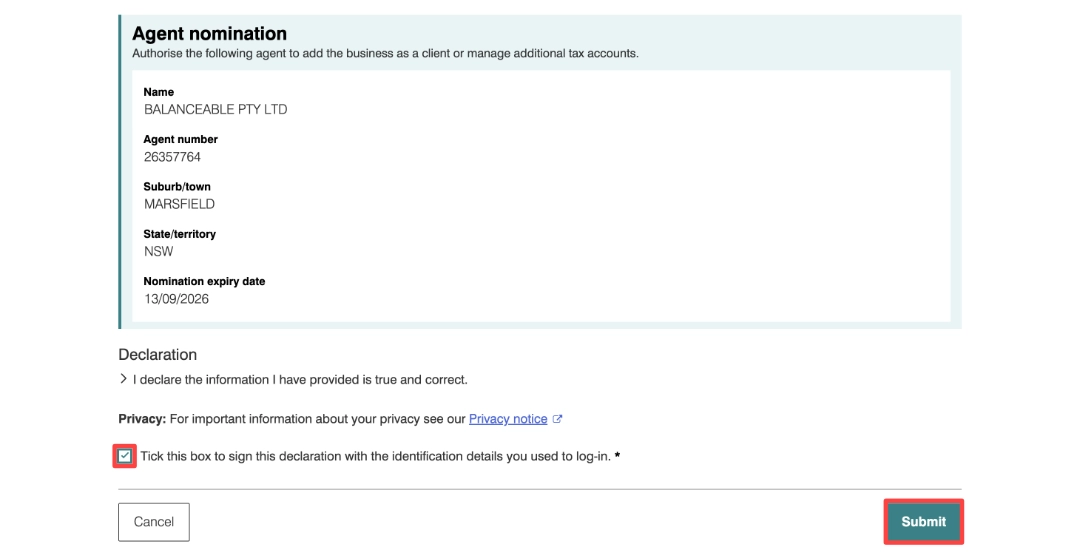
Check the details, complete the declaration and submit the nomination.
You should receive a nomination confirmation and see Balanceable listed under Agent nominations. Save or print the confirmation for your records if you wish.
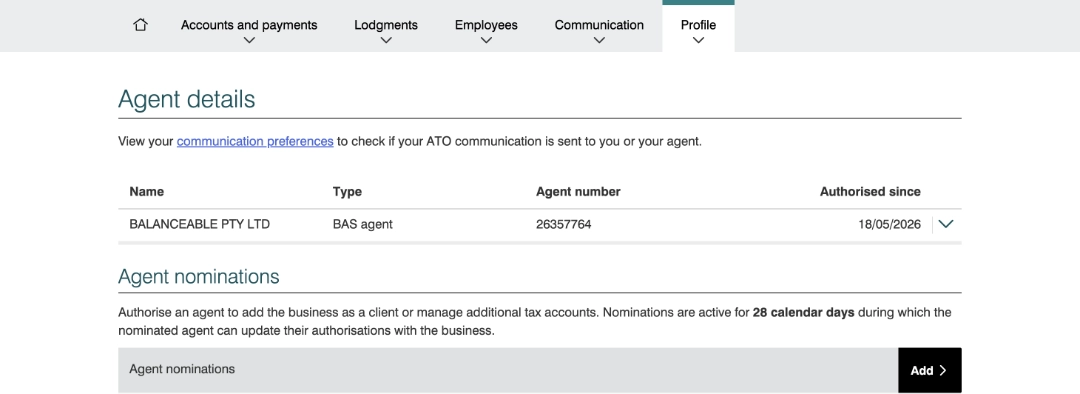
Balanceable will appear under Agent nominations once your nomination has been submitted.
5. Let Balanceable know
Please let us know once you have completed the nomination. The ATO does not automatically notify us, and we have 28 days from the date of nomination to add your business as a client.
If more time is needed, you can extend the nomination in Online services for business. The Extend option becomes available the day after you submit the nomination and adds another 28 days. If the nomination expires, you will need to submit a new one.
ATO resources
Does client-to-agent linking apply to you?
How to nominate your registered agent
ATO screenshot guide: How to nominate an agent in Online services for business (PDF)
RAM: Who can set up a business in RAM?